

Managing Services
How to setup a foundation of success for your self-hosted services

One of the most fundamental aspects of all homelabs is the network. Your network provides the connectivity for your devices and services to communicate within your lab environment, and to the outside world – and its particularly this second part that we need to consider in terms of securing our network. In this post, we will cover two areas you should implement within your home network to enhance the security of your homelab.
As standard, most network routers will provide a single Local Area Network (LAN) for all devices on that network to connect to. This is made up of a single subnet that all connected devices will be assigned an IP address from and can communicate with each other over.
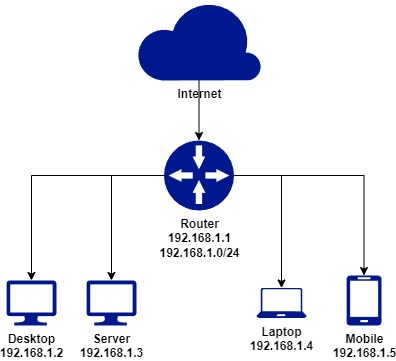
This model provides a simplistic approach to network security, and assumes that all devices on the network are equal, and have full ability to communicate with each other. From a security standpoint, it also means that if an attacker was to gain access to one device, there would be nothing at a networking level to prevent them from moving laterally across other devices.
VLAN’s allow the user to define multiple virtual networks on the same physical router. Each virtual network exists on a separate subnet, providing segregation of devices, and introducing an additional layer of security by not allowing communication between these subnets by default.
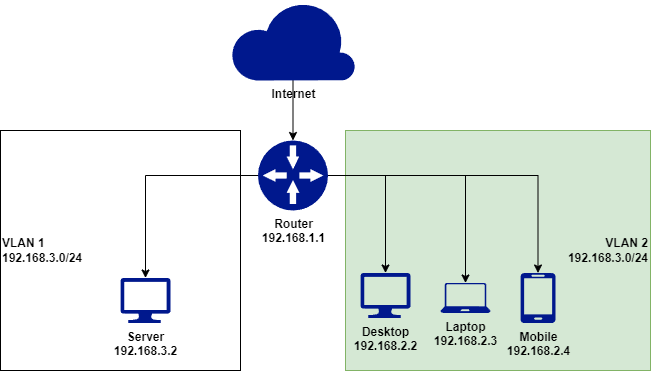
In the example above, we have now introduced two VLAN’s - one for our server where applications will be hosted, and one for our user devices, which will be more exposed to the internet and malicious attacks. This will provide us with a greater level of security in the instance that an end user device is comprised, the attacker will not have direct network access to our server with critical data.
In addition to introducing separation at a local network level for our devices, we should also deploy an internal DNS service to enable secure DNS queries. DNS is the address book of the internet – every time you type in a webpage, or your system tries to connect to something with a domain name, in the background a DNS query is being sent and replied to with the IP destination of that address. By default, these queries are sent between you and a DNS provider unencrypted, but the introduction of an internal DNS service allows us to consume more modern secure methods, such as DNS over TLS (DoT) or DNS over HTTPs (DoH).
In this example, I’ll being deploying an AdGuard Home service within a Proxmox LXC container, although other popular DNS services you could deploy include PiHole or Technitium. You will also need to select an upstream DNS provider – the place where your internal service will query for DNS results, which in my case will be Cloudflare Gateway. Alternative popular upstream DNS providers include Quad9 or OpenDNS.
AdGuard Home provides a simply automated script for deployment, although extensive options for installation can be found here.
On your host, run the following command to launch the automated script;
curl -s -S -L https://raw.githubusercontent.com/AdguardTeam/AdGuardHome/master/scripts/install.sh | sh -s -- -v
On completion, your AdGuard service will be available at http://
Upstream DNS provider – as mentioned I’ll be using a Cloudflare Gateway endpoint, which can be setup for free by registering a Cloudflare account. You should select a provider that can offer either DoT or DoH to ensure DNS queries between you and the provider are encrypted – for me this will be DNS of TLS.
a. Create a DNS Location within Cloudflare Gateway
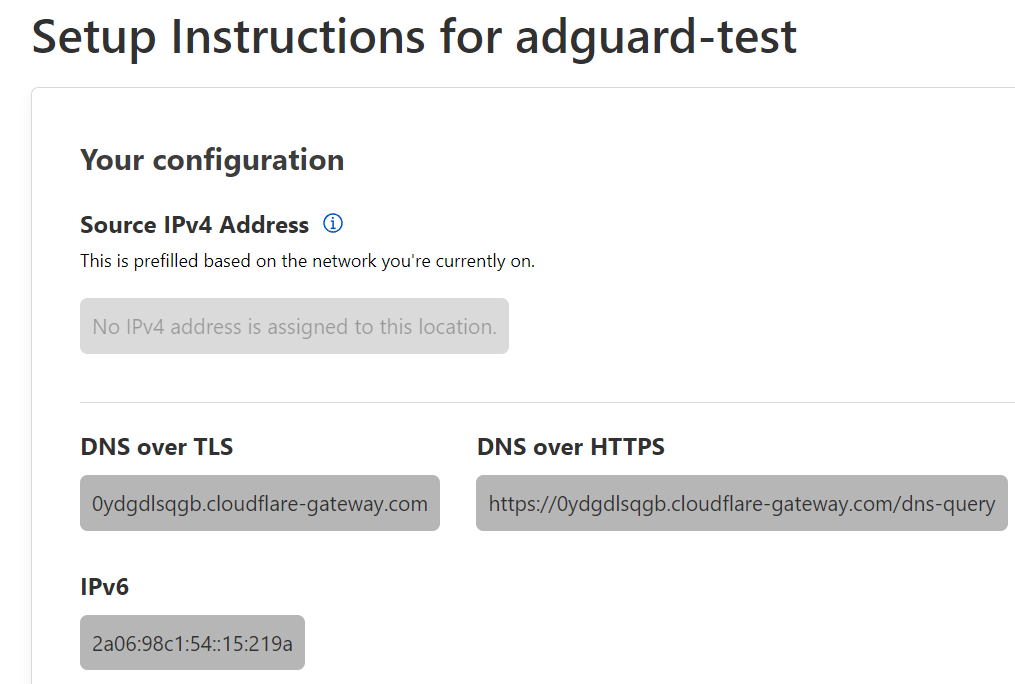 b. Copy the DoT address into your AdGuard DNS Settings
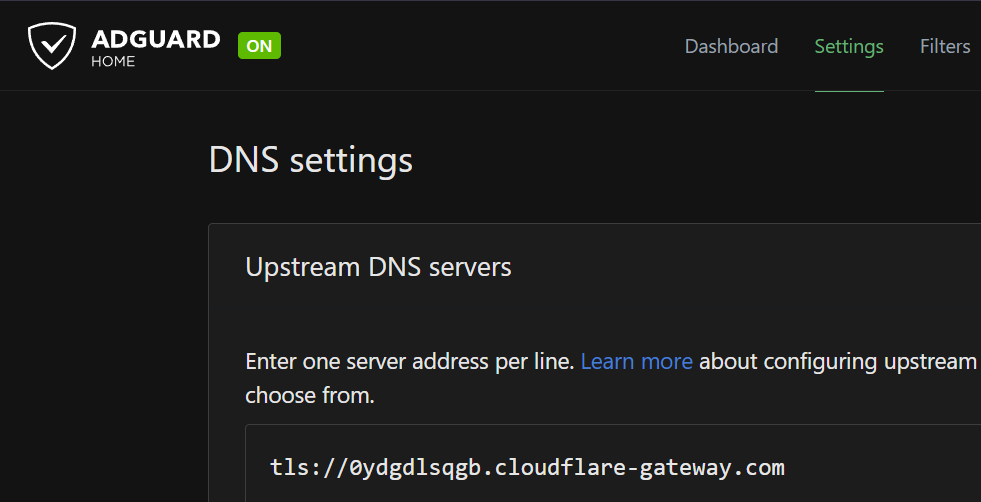 c. Test Upstream, and hit apply to save
Now that our Internal DNS is configured to securley access our Upstream DNS provider, we need to make sure all the devices in our network are using this DNS service. Jump into your router settings and find the DNS server, which is likely set to your ISP’s DNS by default. Change this to the host IP address of your AdGuard Home Service. This will force any device that is connected to the LAN to send its DNS requests internally to AdGuard, which will in turn securely request the result from Cloudflare if required.
How to setup a foundation of success for your self-hosted services
How to safely enable access to your services from anywhere
Using automation to make homelab security efficent