



Network Basics
How to setup your network for homelab-ing 101

One of the most common vulnerabilities homelab users will introduce into their environment comes when they want to expose services to the Internet to access outside of their lab. Traditionally this has been achieved through Virtual Private Network (VPN) services, or opening ports on your firewall to allow inbound connections. While these methods work and can be achieved securely, it still increases the risk profile of your environment by creating a single point of compromise - if an attacker is able to breach your VPN credentials, they are now inside your network, with access to move laterally into other devices.
This has led to a rise in popularity and shift towards Zero Trust Architecture, including a mandate from the US government for all agencies to appoint a Chief Zero Trust officer, and move towards establishing Zero Trust principles. In its most simple form, Zero Trust is an IT security model that requires verification of a users identity and privileges for every request to access services or resources within a private environment, regardless of whether or not these requests come from inside or outside of the network.
More simply put: traditional IT network security trusts anyone and anything inside the network. A Zero Trust architecture trusts no one and nothing.
Cloudflare Access allows you to define security policies around who can access your applications, whether they be self-hosted, or cloud based SaaS services. This will require you to signup for a free Cloudflare account, which includes access to their Zero Trust products.
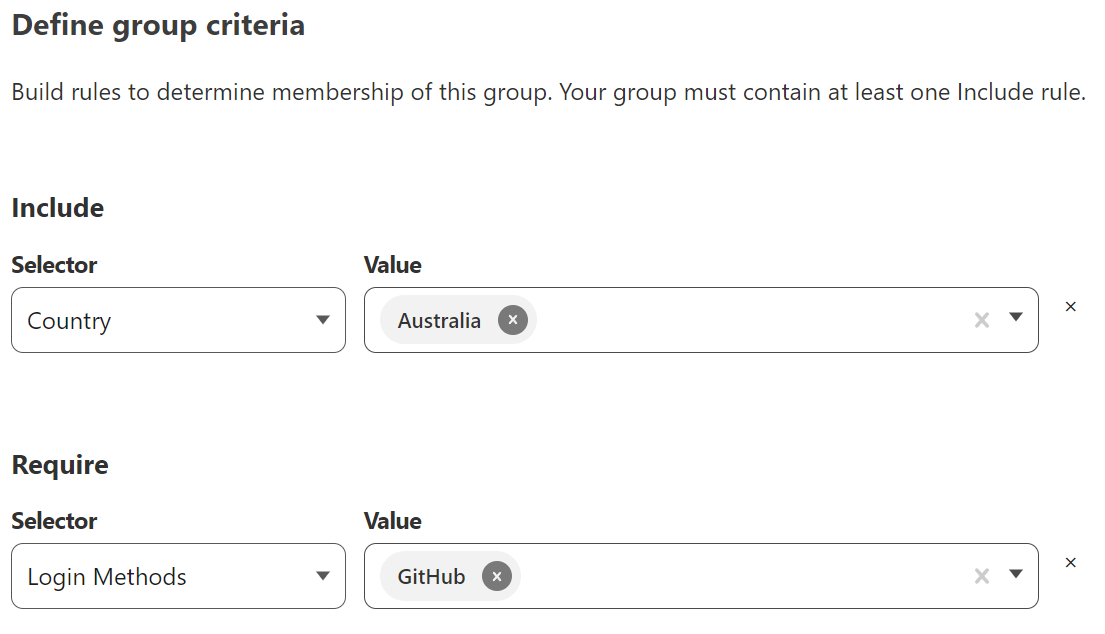
To get started, we first need to define the requirements for our Access Groups. Upon creating a Cloudflare account, your Zero Trust environment will have a default Access Group, however you can create further groups to define requirements for alternative Access use cases.
Ultimately the security posture you choose will depend on your own circumstances and who you are trying to enable access for, but at minimum you should ensure that a strong 2FA login method is required, and that you restrict access to your resources to known locations. For me that is limiting to requests originating in Australia, and requiring authentication through GitHub’s SSO integration. Cloudflare provides multiple options for identity integration, along with its own one-time-password service which can be configured to only accept requests from a certain email address or domain.
Cloudflare Tunnels are use to establish connectivity between your environment or services and the Cloudflare network. It requires you to deploy the ‘cloudflared’ application on your host device, which then establishes and maintains an outbound connection to Cloudflare, providing access to your internal services without needing to open any ports on your firewall.
Detailed instructions and variations for different environment types can be found here.
curl -L --output cloudflared.deb https://github.com/cloudflare/cloudflared/releases/latest/download/cloudflared-linux-amd64.deb &&

sudo dpkg -i cloudflared.deb &&

sudo cloudflared service install
How to setup your network for homelab-ing 101
How to setup a foundation of success for your self-hosted services
Using automation to make homelab security efficent